
Ollama (local LLM)
Run SocTalk's AI triage against a local model with Ollama, no cloud LLM, no per-token cost, data stays on your infrastructure. Ollama exposes an OpenAI-compatible API, and SocTalk's per-tenant runs-worker (the component that actually calls the LLM) talks to it directly.
This page is the end-to-end setup. For the general provider model see LLM providers.
How it fits
The per-tenant runs-worker is the LLM client. Its provider/model/base-URL come from the tenant's config and are rendered into its env:
SOCTALK_LLM_PROVIDER=openai            # openai-compatible maps to "openai"
OPENAI_BASE_URL=http://<host>:11434/v1 # your Ollama endpoint
SOCTALK_FAST_MODEL=qwen2.5:7b
SOCTALK_REASONING_MODEL=qwen2.5:7b
So configuring Ollama is four values: provider openai-compatible, base URL pointing at Ollama, a pulled model, and a dummy API key (Ollama ignores it, but the secret must be non-empty).
1. Install Ollama
On a host the cluster can reach (a node, or any box on the same network):
curl -fsSL https://ollama.com/install.sh | sh

# Bind to all interfaces so the tenant pods can reach it (default is 127.0.0.1 only)
sudo mkdir -p /etc/systemd/system/ollama.service.d
printf '[Service]\nEnvironment="OLLAMA_HOST=0.0.0.0:11434"\n' \
  | sudo tee /etc/systemd/system/ollama.service.d/override.conf
sudo systemctl daemon-reload && sudo systemctl restart ollama

# Pull a tool-capable model (see "Choosing a model" below)
ollama pull qwen2.5:7b
Confirm it answers: curl http://<host>:11434/api/version.
2. Point a tenant at Ollama
Per tenant, via the API (or the equivalent in your automation):
curl -X PATCH https://<your-mssp-host>/api/mssp/tenants/<tenant-id>/llm \
  -H 'Content-Type: application/json' -b <admin-session-cookie> \
  -d '{
        "provider": "openai-compatible",
        "base_url": "http://<host>:11434/v1",
        "model":    "qwen2.5:7b",
        "api_key":  "ollama"
      }'
This persists the tenant's IntegrationConfig and enqueues a re-provision, the controller helm upgrades the tenant chart, the runs-worker rolls with the Ollama env, and the egress NetworkPolicy automatically opens Ollama's port (see the reachability notes). New triage runs go to Ollama.
To make Ollama the default for every new tenant, set defaults.llm in the soctalk-system values at install:
defaults:
  llm:
    provider: openai-compatible
    baseUrl: http://<host>:11434/v1
    model: qwen2.5:7b
llm:
  provider: openai
  apiKey: "ollama"
V1: the Settings UI shows the wrong provider
In this release the MSSP UI Settings → LLM panel reflects the API pod's hard-coded defaults (e.g. gpt-4o), not the tenant's actual config. The authoritative source is the per-tenant IntegrationConfig (GET /api/mssp/tenants/{id}/llm) and the runs-worker env. Don't trust the Settings page to confirm Ollama.
3. Reachability checklist (the things that bite)
- Bind
0.0.0.0. Ollama listens on127.0.0.1by default, pods can't reach that. SetOLLAMA_HOST=0.0.0.0:11434(step 1). - Don't use
localhost/127.0.0.1in the base URL. That's the pod, not the Ollama host. Use the host's routable IP (or run Ollama in-cluster as a Service). Pods reach private-range IPs (10.0.0.0/8,172.16.0.0/12) through the default egress allowances. - Egress port. The tenant's
runs-workeregress NetworkPolicy opens the LLM port, derived from the base URL (so:11434for Ollama,:8000for vLLM, etc.). This is automatic onsoctalk-tenantchart ≥ 0.1.2. On older charts the policy only allowed:443: either upgrade, allow the port manually, or front Ollama with a TLS reverse proxy on:443. - Dummy API key. Leave it empty and the chart skips the Secret → the worker starts with no
OPENAI_API_KEYand errors. Use any non-empty string.
4. Verify
Confirm the worker is wired to Ollama and a real triage flows through it:
# 1. tenant config (authoritative)
curl -s https://<host>/api/mssp/tenants/<id>/llm   # provider/base_url/model = Ollama

# 2. worker env
kubectl -n tenant-<slug> get deploy soctalk-runs-worker \
  -o jsonpath='{range .spec.template.spec.containers[0].env[*]}{.name}={.value}{"\n"}{end}' \
  | grep -E 'LLM_PROVIDER|MODEL|OPENAI_BASE'

# 3. Ollama actually serving SocTalk
ollama ps                                   # model loaded while triaging
journalctl -u ollama | grep /v1/chat/completions   # 200s during a triage
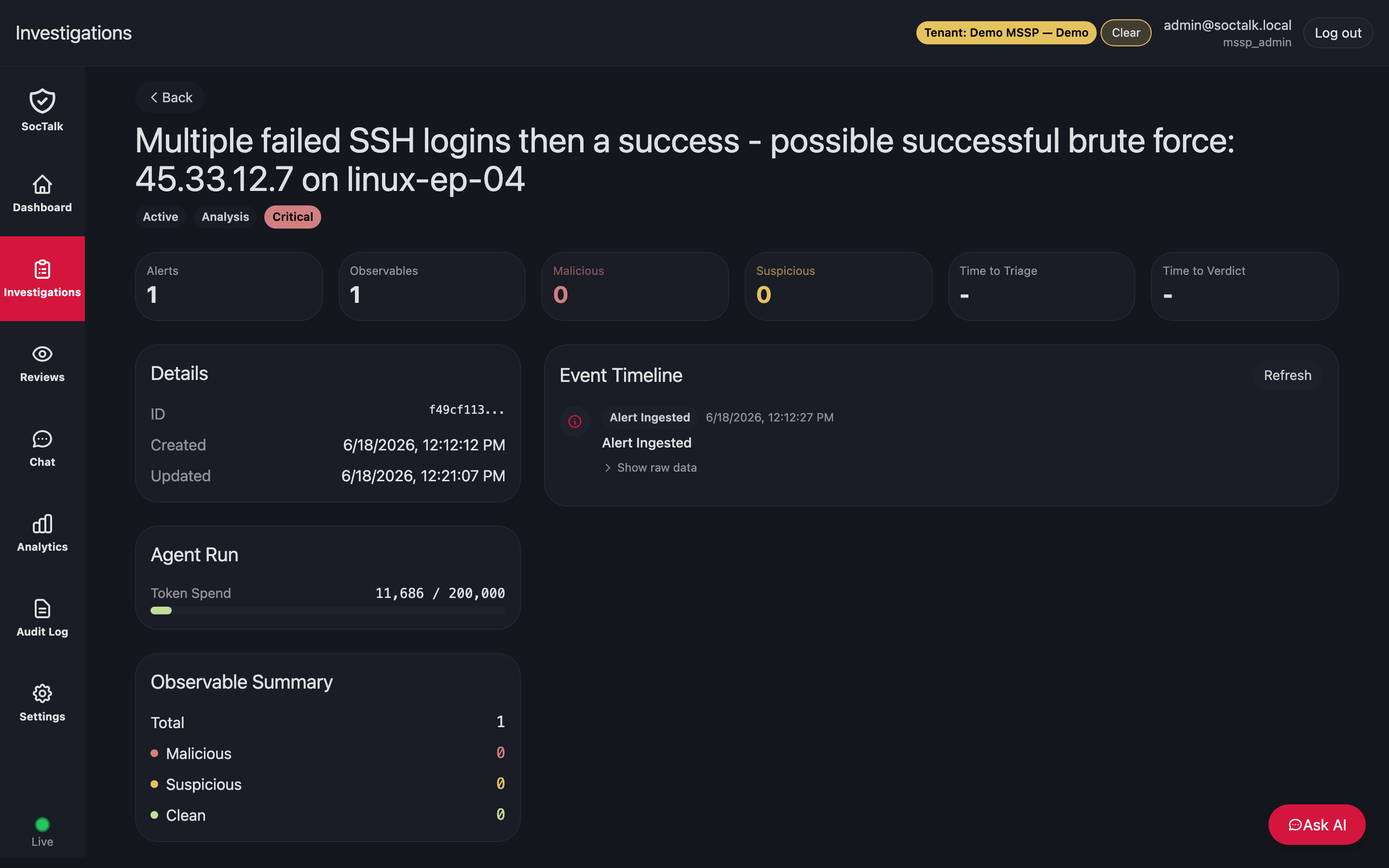
When an alert comes in, the investigation is triaged by the local model, the Agent Run / Token Spend on the investigation reflects the tokens generated by Ollama:
Choosing a model
SocTalk's pipeline does tool-calling + structured JSON verdicts, so pick an instruct model with solid tool support, qwen2.5, llama3.1, mistral-nemo. Small/older models often fail the structured output. The reasoning tier benefits most from a stronger model; you can split them with fast_model / reasoning_model (a small fast router + a larger verdict model).
CPU is slow
On CPU, a 7B model runs at ~tens of tokens/sec, and a single triage makes several LLM calls, expect minutes per investigation. Use a GPU host for usable latency, or a smaller fast model.