
Connecting SocTalk to an existing Wazuh
Most Wazuh shops do not start from zero. There is already a manager watching agents, an indexer holding months of alerts, and a dashboard the team already investigates from. SocTalk's provided tenant profile is built for exactly this situation: SocTalk installs only its own components, connects to your Wazuh over the network, and starts triaging the alerts your deployment already produces. Nothing about your Wazuh changes, no agents re-enroll, and no data migrates.
This guide walks the whole path on a single Linux host, from OS package to the first AI-triaged escalation, and was verified end to end against SocTalk v0.2.0 with Wazuh 4.12.0. Where this release has rough edges, the guide says so and gives the workaround.
If you want SocTalk to deploy and manage Wazuh for you instead, that is the poc or persistent profile; see Onboarding a customer tenant.
What you need before starting
Your existing Wazuh must be reachable from the SocTalk host on two ports: the indexer's OpenSearch API (:9200) and the manager's REST API (:55000). Those are the defaults, and on v0.2.0 they were the only ports that worked: the tenant's egress NetworkPolicy opened exactly 9200 and 55000, so a Wazuh republished on a different port (behind a NodePort, a load balancer, or a reverse proxy) was blocked before the connection was made, even though everything else reported healthy. Fixed in v0.2.1 (soctalk#147): the egress ports are now derived from the URLs you supply, so any port works. On v0.2.0, publish your indexer and manager API on their standard ports. SocTalk authenticates to each separately, so have both credential pairs ready:
- an indexer user allowed to search
wazuh-alerts-*(the built-inadminworks, though a read-only user is better practice), - a manager API user such as the built-in
wazuh-wui.
Self-signed certificates on the Wazuh side are the norm and are supported; you will pass verify_ssl: false at onboard time. You also need a per-tenant LLM API key. The provided profile requires it at onboard, because a bring-your-own-SIEM tenant has no install-shared fallback: the onboard request is rejected with a 422 if the key is missing.
The SocTalk host itself needs the usual footprint: a systemd-based Linux (Ubuntu 24.04 and Rocky 9 are the verified pair), 4 vCPU and 8 GB RAM as a floor for the control plane plus one provided tenant, and ports 80/443/6443 free. Since the tenant runs no Wazuh of its own, a provided tenant is far lighter than a persistent one.
Install SocTalk from the OS package
Download the package for your distro from the releases page and install it; the full flavor matrix is on Install from an OS package.
curl -LO https://github.com/soctalk/soctalk/releases/download/v0.2.1/soctalk_0.2.1_amd64.deb
sudo apt-get install -y ./soctalk_0.2.1_amd64.deb
The package ships an environment template at /etc/soctalk/soctalk.env.example. Copy it, fill in your MSSP identity, admin credentials, hostname, and LLM key, and keep it root-only:
sudo cp /etc/soctalk/soctalk.env.example /etc/soctalk/soctalk.env
sudo chmod 600 /etc/soctalk/soctalk.env
sudo vi /etc/soctalk/soctalk.env
Then run the installer unattended:
sudo bash -c 'set -a; . /etc/soctalk/soctalk.env; soctalk install --skip-consent'Pass --skip-consent (or -y) explicitly. In v0.2.0 the consent prompt still fires on a non-interactive terminal even when every SOCTALK_* variable is set, and without a TTY the install aborts with /dev/tty: No such device or address.
The installer brings up k3s and Helm if the host lacks them, installs the soctalk-system chart pinned to the release version, and prints the URL and login when done. Three pods in the soctalk-system namespace (api, app-ui, postgres) mean the control plane is up:
sudo /usr/local/bin/k3s kubectl -n soctalk-system get podsOne switch before onboarding: network policies
Here is the sharp edge in v0.2.0, up front so you do not hit it mid-onboard: a provided tenant renders a Cilium FQDN egress policy for the external SIEM hosts, but the k3s that soctalk install sets up runs flannel, which has no Cilium CRDs. Provisioning a provided tenant on a stock v0.2.0 install therefore fails at the Helm step with
no matches for kind "CiliumNetworkPolicy" in version "cilium.io/v2"and the tenant lands in degraded. This is fixed after v0.2.0 (soctalk#107): the chart now gates that object on the CRD actually existing and adds plain NetworkPolicy egress for IP-literal SIEM hosts, so a stock flannel install provisions cleanly. On v0.2.0 the workaround on a single-host install is to disable tenant network policies before onboarding:
sudo /usr/local/bin/k3s kubectl -n soctalk-system set env deploy/soctalk-system-api \
  SOCTALK_TENANT_NETWORK_POLICIES_ENABLED=0
sudo /usr/local/bin/k3s kubectl -n soctalk-system rollout status deploy/soctalk-system-api
Be clear about the tradeoff: this turns off the namespace-isolation NetworkPolicies for tenants provisioned afterwards, which is acceptable on a dedicated single-tenant-class lab or pilot host and not what you want on a shared multi-tenant production cluster. If you run Cilium as your CNI, none of this applies and you should leave policies on.
If you already onboarded and the tenant sits in degraded with the error above, set the switch and press Retry Provisioning on the tenant page; retries are idempotent and resume cleanly.
One more thing specific to a single-box lab, where the "existing" Wazuh often runs in Docker on the very same host you installed SocTalk on, reached by the host's own IP. k3s enforces NetworkPolicy through its bundled controller, and a pod reaching the node's own IP for a Docker-published port is a hairpin that the policy layer does not route cleanly even when an egress rule permits it. The symptom is the adapter logging ingest_failed: All connection attempts failed while the same Wazuh answers fine from the host. Disabling tenant network policies as above clears it. A Wazuh on a separate host is an ordinary outbound path and does not hit this.
Onboard the tenant
In the MSSP UI, Tenants, then + New Tenant, pick the provided profile and the wizard splices in an External SIEM step that a PoC or persistent tenant does not have.
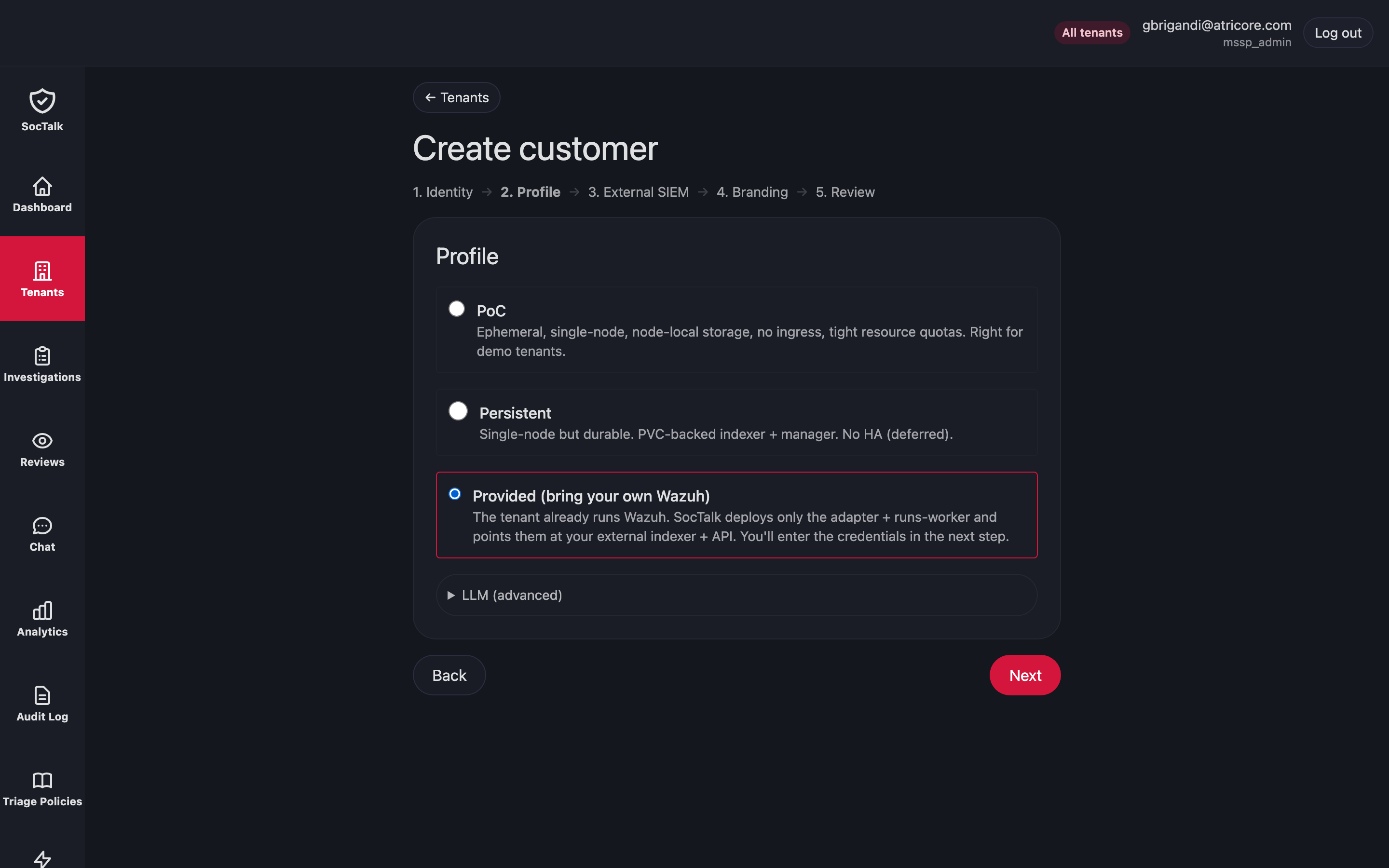
That step is where you point SocTalk at your Wazuh. The indexer (OpenSearch, port 9200) and the manager API (port 55000) authenticate with separate credentials, and a provided tenant supplies its own LLM key because the MSSP shared install key does not apply to this profile.
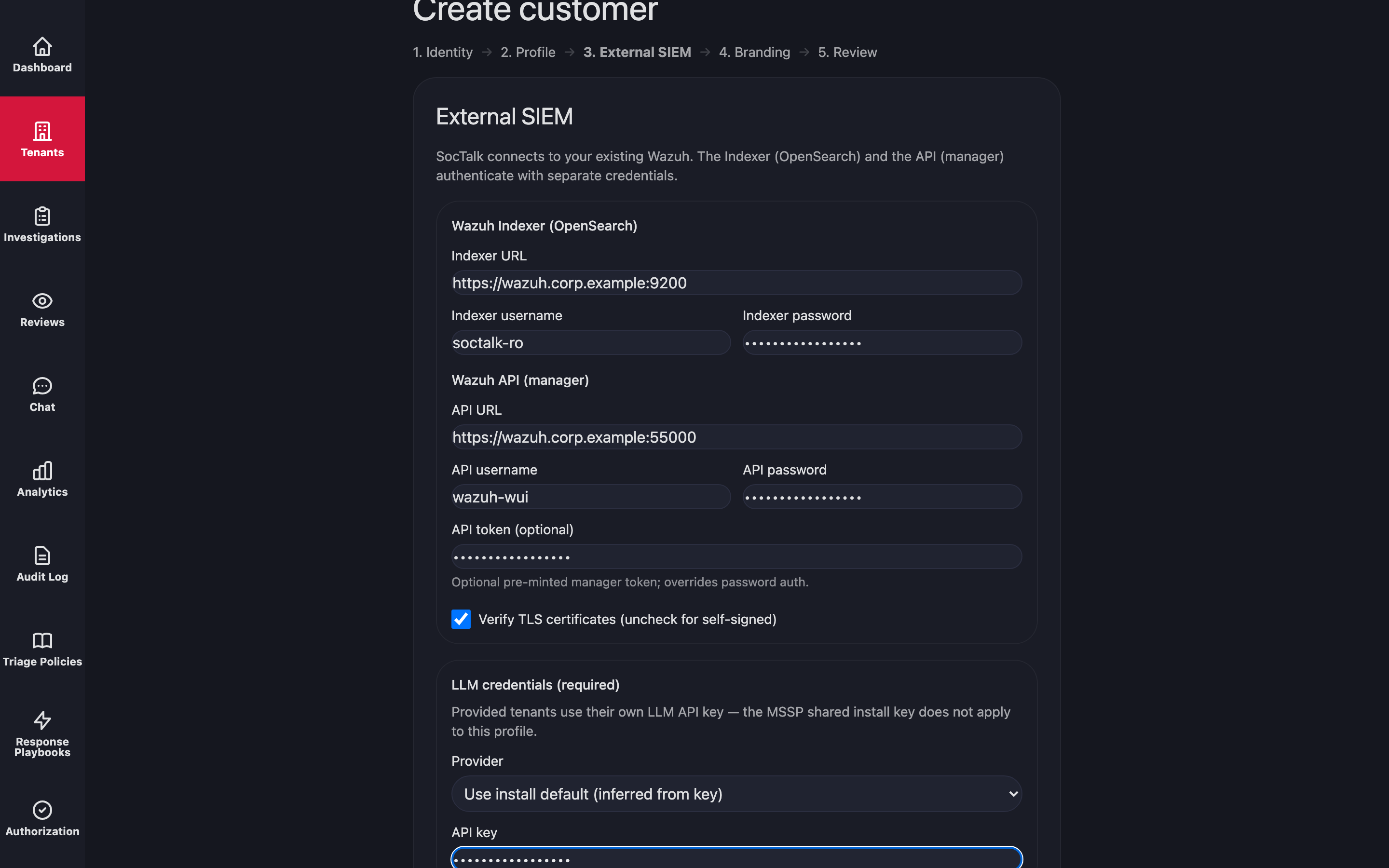
The same operation over the API is one POST to the onboard endpoint. Note the path: POST /api/mssp/tenants/onboard is the wizard endpoint that understands profiles and external SIEM material. The plain POST /api/mssp/tenants is an identity-only create; on v0.2.0 it silently ignores those fields and leaves you a poc tenant that never provisions, so always send a provided onboard to /onboard.
# authenticate once; the cookie jar carries the MSSP session
curl -sk -c cookies.txt -H "Origin: https://<your-host>" -H "Content-Type: application/json" \
  -X POST "https://<your-host>/api/auth/login" \
  -d '{"email": "<admin-email>", "password": "<admin-password>"}'

curl -sk -b cookies.txt -H "Origin: https://<your-host>" -H "Content-Type: application/json" \
  -X POST "https://<your-host>/api/mssp/tenants/onboard" -d '{
  "slug": "orion-soc",
  "display_name": "Orion Labs",
  "profile": "provided",
  "llm_provider": "anthropic",
  "llm_base_url": "https://api.anthropic.com",
  "llm_model": "claude-sonnet-4-6",
  "llm_api_key": "sk-ant-...",
  "external_siem": {
    "indexer_url": "https://198.51.100.20:9200",
    "indexer_username": "admin",
    "indexer_password": "...",
    "api_url": "https://198.51.100.20:55000",
    "api_username": "wazuh-wui",
    "api_password": "...",
    "verify_ssl": false
  }
}'
A 202 with "profile": "provided" in the body confirms the right path. Pick the slug with care: slugs stay reserved by archived tenants, so a decommissioned test tenant does not free its name for reuse.
Provisioning a provided tenant is quick because there is no Wazuh chart to install; the controller skips that phase and records a wazuh_skipped_provided lifecycle event instead. On the verified run the tenant went pending to active in under twenty seconds.
Verify the connection
The tenant namespace should contain exactly two workloads, the adapter and the runs-worker, and no Wazuh pods:
sudo /usr/local/bin/k3s kubectl -n tenant-orion-soc get podsYour connection material lands in a namespace-local Secret named tenant-external-siem-creds holding INDEXER_USERNAME, INDEXER_PASSWORD, WAZUH_API_USERNAME, and WAZUH_API_PASSWORD, plus WAZUH_API_TOKEN when you supplied one. The adapter reads the indexer URL from its environment and the credentials from that Secret. Its log tells you within seconds whether the connection works, because it polls the alerts index continuously:
POST https://198.51.100.20:9200/wazuh-alerts-*/_search "HTTP/1.1 200 OK"
heartbeat_ok
The tenant detail page shows the same thing without reading logs. The External SIEM panel echoes the indexer and API URLs you supplied, and the Adapter ingest status line reports reachable with a forwarded-alert count once the first alerts flow.
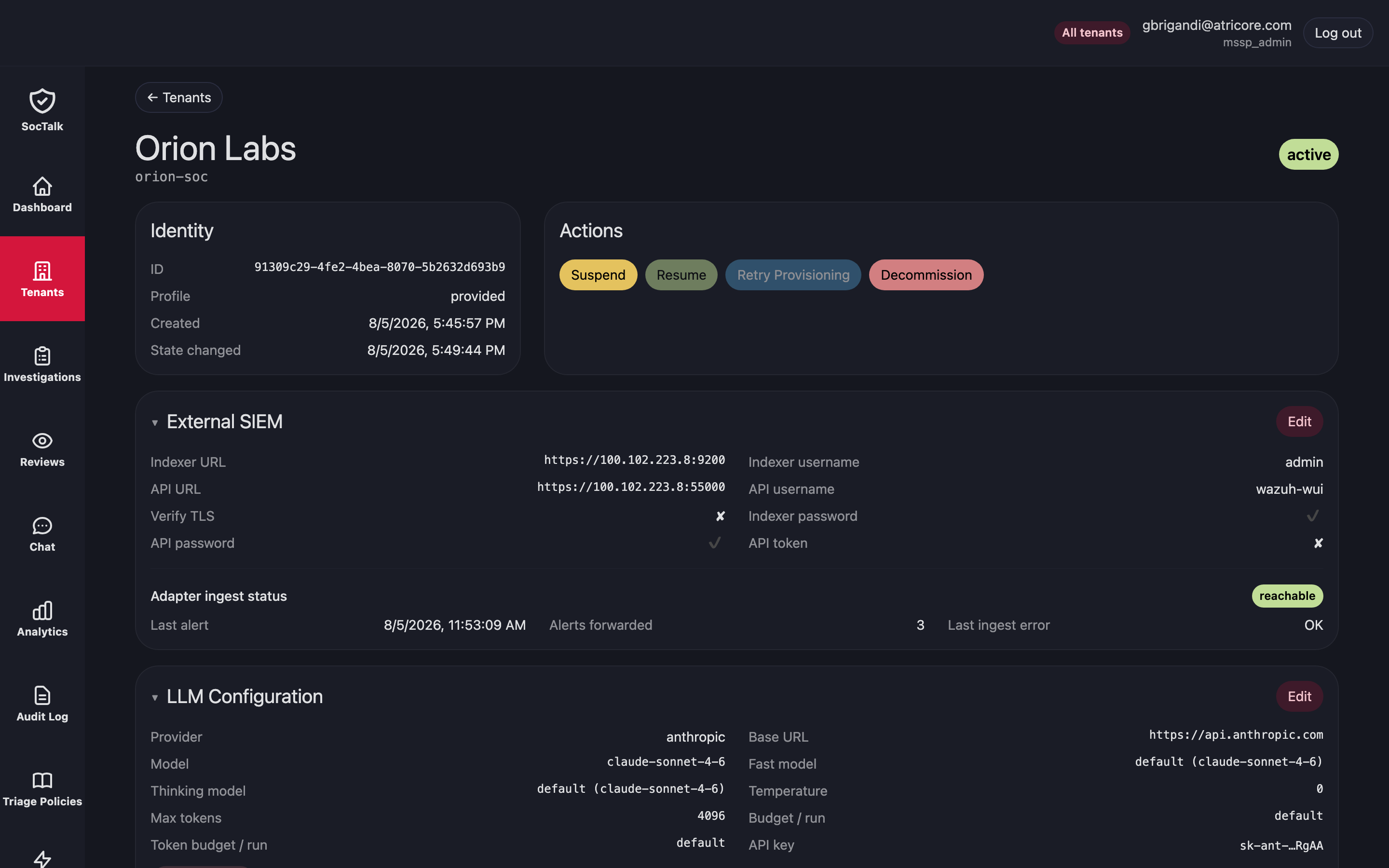
The failure modes are easy to tell apart from that one log line. A 401 means the indexer credentials are wrong, and note the connection itself succeeded. A TLS error means verify_ssl does not match your certificate situation. ingest_failed: All connection attempts failed means nothing reached the indexer at all: the host is unreachable, or — on v0.2.0 only — your Wazuh is published on a port other than 9200/55000 and the tenant egress policy dropped it.
One caveat if you republish your indexer on a different address or port to reach SocTalk, for example through a NodePort, a port-forward, or a reverse proxy. Test the credentials through the exact URL you are going to configure, not against the indexer's own :9200. On a lab rig built that way we saw the same indexer, the same pods and the same credentials answer 200 on :9200 and 401 through the republished port, reproducible with plain curl from the host and therefore nothing to do with SocTalk. We did not chase the cause; the practical lesson is that the republished path is its own thing and deserves its own check:
# must return 200 for the URL you will put in the onboard payload
curl -sk -u '<indexer-user>:<indexer-password>' https://<host>:<port>/
If that returns 401 while the indexer's own port returns 200, fix the exposure before onboarding — SocTalk will faithfully reproduce the 401.
Credentials rotate without re-onboarding. PATCH /api/mssp/tenants/{id}/external-siem takes any subset of the onboard fields, rewrites the Secret, and rolls the adapter pod so it picks up the fresh material:
curl -sk -b cookies.txt -H "Origin: https://<your-host>" -H "Content-Type: application/json" \
  -X PATCH "https://<your-host>/api/mssp/tenants/<tenant-id>/external-siem" \
  -d '{"indexer_password": "<new-password>"}'
The first triaged alert
From here the ingest, promotion, run-execution, and review workflow behave the same as for a SocTalk-managed Wazuh (the depth of enrichment differs on v0.2.0, see Current limitations): the adapter forwards new alerts at or above the minimum severity (rule level 10 by default, configurable with SOCTALK_ADAPTER_MIN_SEVERITY), the control plane promotes what matters into investigations, and the tenant's runs-worker executes AI triage with the tenant's own LLM key.
The honest way to test is to make your existing Wazuh produce a real high-severity alert, for example a burst of failed SSH logins against a monitored agent followed by a success. If you would rather not touch production endpoints, indexing a synthetic alert document straight into wazuh-alerts-4.x-<date> with a rule.level of 12 exercises the identical path, since the adapter reads from the index rather than the manager.
On the verified run, an SSH brute-force-then-success alert went from indexer document to finished triage in about a minute: forwarded by the adapter, promoted, investigated by the supervisor across several LLM calls, and closed as escalate with 0.95 confidence, landing in the MSSP review queue for a human. Total spend for the run was about thirty cents against the tenant's Anthropic key, tracked against the per-run token budget described in AI pipeline. After a few such test alerts, the review queue holds them side by side.
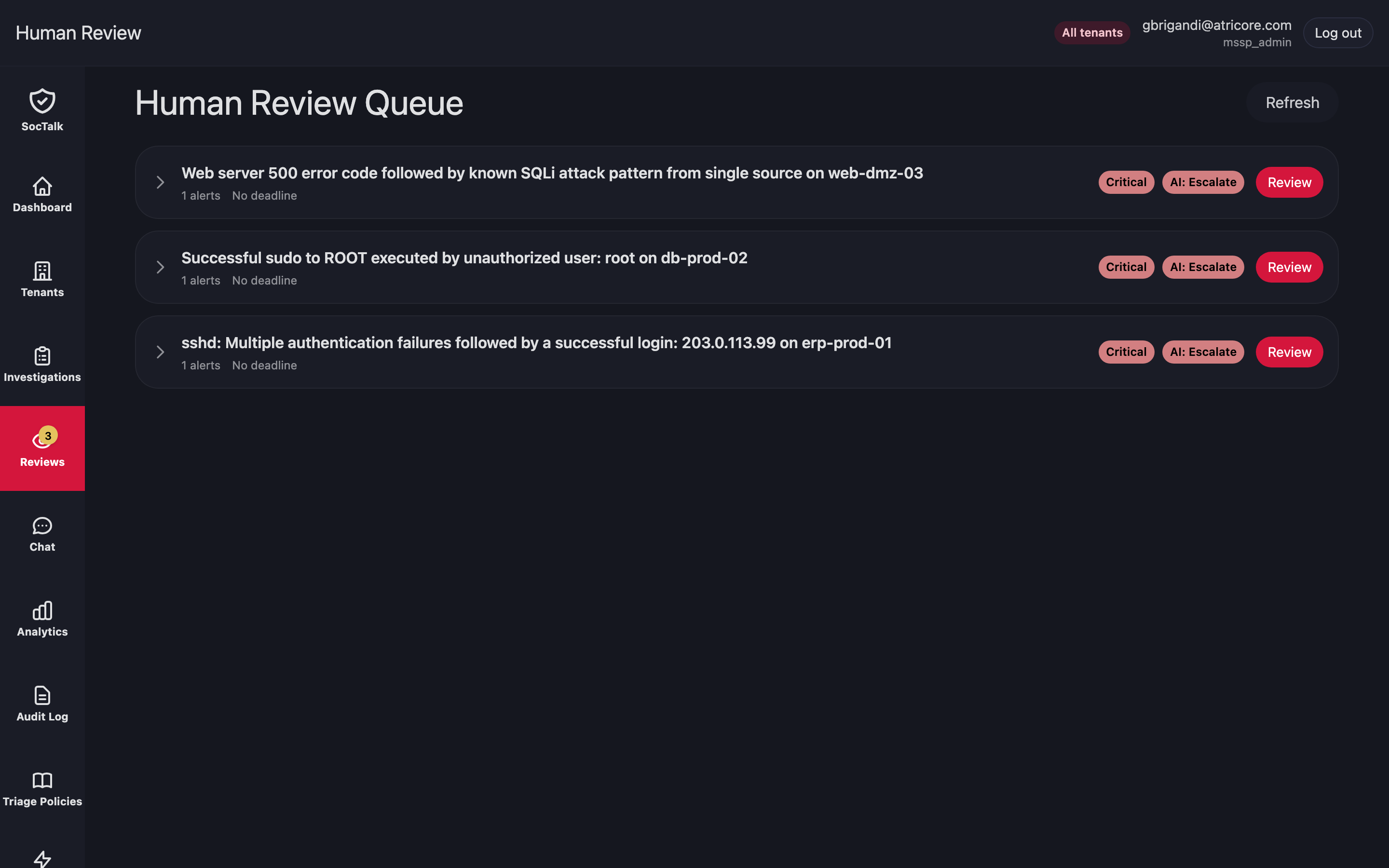
Each row carries the AI verdict and opens the full investigation, so an analyst confirms or overrides on the evidence rather than starting the triage themselves.
Current limitations
The caveats below were verified on the versions noted. Check the release notes for your version before applying a workaround.
- Enrichment reaching the external Wazuh (v0.2.0 only). On v0.2.0 the runs-worker's Wazuh MCP tooling was not wired to a provided tenant's manager API, so triage ran on the alert payload alone, without live pivots into agent state or log history. Fixed after v0.2.0 (soctalk#109): the worker now connects the bundled
mcp-server-wazuhMCP server to the tenant's own Wazuh, so the triage graph queries agents, processes, ports, vulnerabilities, and manager logs during an investigation the same way a SocTalk-managed tenant does. - Provisioning on a stock flannel install (v0.2.0 only). The Cilium egress policy issue described earlier, with its network-policy workaround. Fixed after v0.2.0 (soctalk#107).
- Non-standard SIEM ports (v0.2.0 only). The tenant egress NetworkPolicy derived the external SIEM host from the URLs you supplied but pinned the ports to 9200 and 55000, so a Wazuh reachable on anything else was dropped at the network layer while the tenant still reached
active, the credentials Secret was written and the adapter heartbeated normally — the only symptom beingingest_failed: All connection attempts failed. Verified side by side on one cluster with the ports as the only variable. Fixed in v0.2.1 (soctalk#147): the ports are read from the URLs you supply and any port works, including through a NodePort, load balancer or reverse proxy.